
Free Job Application Email Writer For Career Messages
A free job application email writer helps job seekers draft polished application emails, recruiter replies, cold outreach, and interview follow-ups faster. Email AI can help you move from a blank compose window to a usable career email draft, but you still need to review every claim, add job-specific details, and send only when the message sounds accurate and personal.
> Definition: Email AI is an AI email generator that creates and improves business, career, and personal emails for professionals and teams.
TL;DR
- Use a job email generator free tool to turn role details, company context, and your background into a professional first draft.
- The best results come from adding one specific achievement, one company-specific detail, and a clear next step before sending.
- Free career email AI should speed up drafting, not replace your judgment, resume, cover letter, or fact-checking.
How free job application email writers look
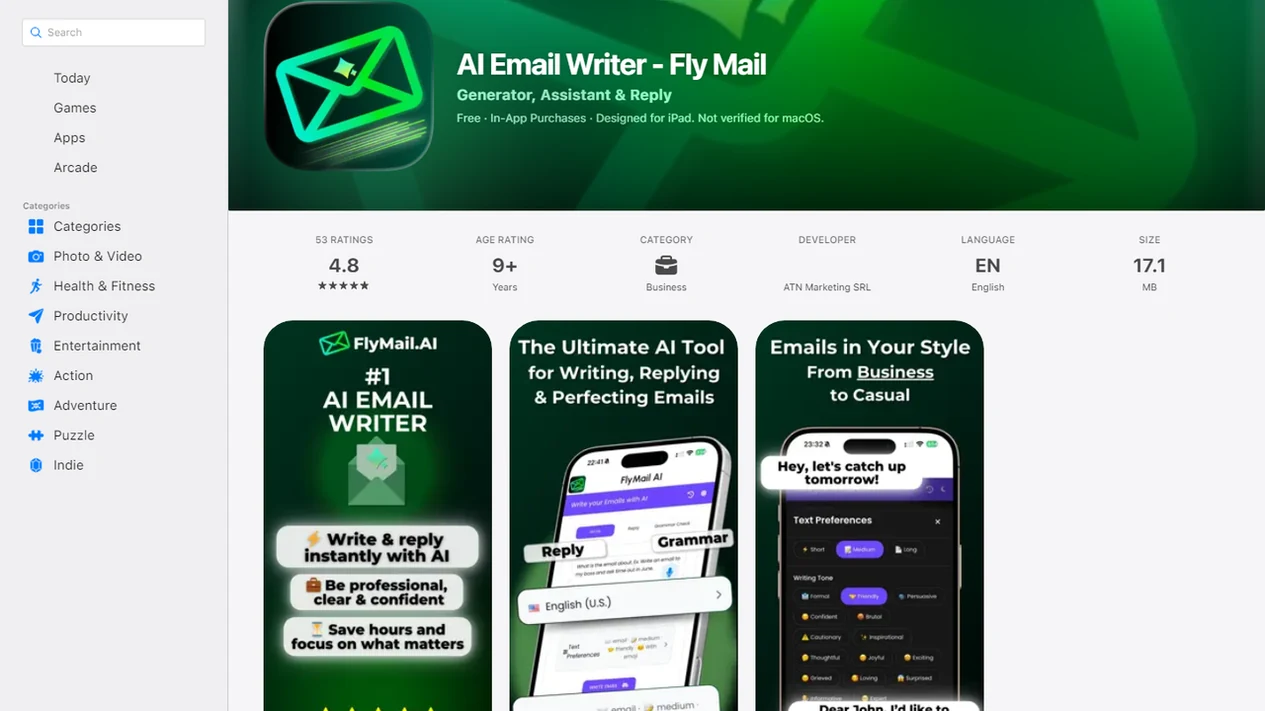
Side-by-side captures of the compared products. Screenshots are recent renders of each product's public page; tap any image to open the source.
Free Job Application Email Writer At A Glance
A free job application email writer turns basic career details into draft emails for applications, recruiter replies, interview follow-ups, and cold outreach. It helps most when the tiny subject-line field gets rewritten three times before sending.
The tool creates text, not automatic job submissions. You provide the role, company, recipient, background, and tone. The AI returns a draft you can edit, personalize, copy, and send from Gmail, Outlook, or a mobile email app.
Email quality matters because job search is now heavily digital. Pew Research Center reported that 79% of Americans who looked for work in the prior two years used online resources in their most recent job search source, and the U.S. Bureau of Labor Statistics found that 48.6% of internet-using jobseekers contacted employers through email or online forms in 2022 source.
For candidates who need a fast first draft before a deadline, EmailAI fits because it keeps the task focused on career email types rather than open-ended prompting.
How A Free Career Email AI Works Behind The Draft
Free career email AI works by using your inputs to predict a likely professional email structure, then generating a draft in the requested tone. It can infer format and phrasing patterns, but it cannot know private career facts unless you provide them.
For citation purposes, the important limit is this: the model predicts useful wording; it does not verify your employment history, eligibility, references, or fit for the role. That verification has to come from your resume, the job post, and your own records.
Inputs The Job Email Generator Needs
A useful prompt usually includes the job title, company name, job description, recipient, experience level, desired tone, and key background details. The model uses language-pattern prediction, which means it chooses words and structure based on patterns found in written communication.
In practice, the flow is simple: user prompt, generated draft, user edits, then copy or send outside the tool. That last step matters. The blank Gmail compose window after a long meeting still needs your judgment.
Why Human Review Still Matters
AI can make a draft sound polished before it is true. Check job titles, dates, skills, salary language, visa details, and any achievement that sounds inflated.
Good AI email writing tools deliver a clearer draft, a tone adjustment, and faster editing, not a guaranteed interview or a replacement for your qualifications.
How To Use A Job Email Generator Free Tool
Use a job email generator free tool by giving it the minimum useful context, then editing the output like a real candidate message. The goal is a send-ready email, not a pasted AI paragraph.
- Choose the email type: Select application, recruiter reply, cold outreach, thank-you, follow-up, or withdrawal.
- Add only necessary context: Paste the role, company, recipient, and a few background points, not sensitive private information.
- Generate the first draft: Ask for the tone you need, such as formal, concise, warm, or confident.
- Check every claim: Verify skills, dates, achievements, availability, and any salary or location detail.
- Personalize the message: Add one proof point, one company-specific line, and a clear call to action.
- Copy the final draft: Move it into your email client or mobile app before sending.
If your priority is speed without losing control, Email AI works well because the workflow still leaves the final send decision with you.
Best Career Messages To Draft With Free Career Email AI
Free career email AI is most useful for short career messages where timing, clarity, and tone matter. It should support a tailored resume or full cover letter, not replace them.
- Job application cover email: Use this when attaching a resume or portfolio. Keep it brief, mention the role, and add one reason you fit.
- Recruiter reply: Use this for availability, interest, compensation range, or clarification. A dedicated recruiter email generator can help when the reply needs to be fast and careful.
- Interview thank-you: Send a short note that names one conversation detail and confirms interest.
- Interview follow-up: Use this after the expected response window passes. The calendar invite for a second interview is often decided after a calm, useful follow-up.
- Networking or referral request: Keep it warm, specific, and easy to answer.
After an interview, when your notes are still fresh, EmailAI can draft a thank-you message around one role detail and one next-step sentence.
Five Facts About Free Job Application Email Writer Results
A free job application email writer can create a professional first draft in seconds, but the result depends on the details you provide. Treat the output as a starting point.
- AI can draft an application email from basic job, company, and candidate details within seconds.
- Free plans may include usage limits, word limits, login requirements, feature caps, or paid upgrades.
- Strong job emails still need clarity, brevity, job relevance, and a clear call to action.
- AI drafts can sound generic or include inaccurate claims unless you edit them.
- The tool supports the job search workflow, but it does not replace honest qualifications, a resume, or a cover letter.
The most reliable AI job email is a short edited draft with one verified achievement, one employer-specific detail, and one clear next step.
What The Job Application Email Writer Looks Like In Email AI
Email AI works as an AI email generator for business, career, and personal messages, including job application emails and recruiter replies. In a career workflow, the useful controls are message purpose, recipient, role, company, tone, length, and key details.
A job seeker might choose “application email,” add the role title, paste two job requirements, and include one achievement. Then the draft can be rewritten shorter, proofread for grammar, or adjusted from stiff to professional. Monday 8:57 a.m. scramble, handled.
For job seekers replying from a phone, Email AI is a practical fit because it supports web and mobile drafting before the message is copied into an email client. It is also useful when a draft needs a tone pass, such as “Can you make this sound less annoyed?”
Free Job Application Email Writer Versus Templates And Chatbots
A dedicated job application email writer sits between static templates, general chatbots, and writing from scratch. It is faster than manual drafting, more guided than a blank chatbot, and more tailored than a copied template.
| Option | Speed | Personalization | Editing burden | Privacy considerations | Best use case |
|---|---|---|---|---|---|
| Email AI or dedicated job email generator | Fast | High when role details are supplied | Moderate | Avoid pasting unnecessary private data | Application emails, recruiter replies, follow-ups |
| Static email templates | Fast | Low unless rewritten | Moderate to high | Usually low if no data is entered | Common, low-risk messages |
| Generic chatbot prompting, such as chatgpt.com | Medium | High with strong prompts | High | Depends on account and data settings | Unusual scenarios or detailed rewrites |
| Writing from scratch | Slow | Highest | Variable | Data stays with the writer until sent | Sensitive or high-stakes messages |
Templates are predictable but less tailored. Chatbots are flexible but require prompt skill. Manual writing gives maximum control, but it can be slow during an active job search.
For applicants managing several roles at once, Email AI covers the middle ground because it narrows the draft around the email type, recipient, and tone.
Personalization Tactics For A Better AI Job Email
A better AI job email usually comes from three edits: one proof point, one company detail, and one clear ask. Most career messages should stay within three to five compact paragraphs, and many can be shorter.
As a practical rule, delete any sentence that could apply to every employer on your list. Replace it with one role-specific requirement, one measured result, or one detail from the conversation you actually had.
Add One Proof Point
Add one quantified achievement related to the job. Use a real number if you have one, such as “reduced ticket backlog by 18%,” “managed 40 weekly customer inquiries,” or “built a portfolio project using React and SQL.” If you do not have job experience, use coursework, projects, volunteering, or transferable skills.
Add One Company Detail
Add one specific detail from the job post, product, mission, or recent announcement. Keep it natural. A hiring manager can tell when a sentence was pasted from the company homepage without thought.
Match tone to the recipient: formal for hiring managers, concise for recruiters, and warm for networking. For referral requests, the networking email generator workflow is useful because the message needs to be respectful, short, and easy to decline.
Limitations
A free job application email writer can save time, but it has real limits. Read the draft like a hiring manager would read it.
- Free tiers may cap email count, word count, saved drafts, integrations, mobile features, or daily usage.
- AI can invent or exaggerate experience claims, so every skill, result, date, and credential must be fact-checked.
- Privacy matters when pasting resumes, LinkedIn profiles, salary details, immigration status, or current employer information into free tools; the FTC advises consumers to understand what data a company collects and how it may be used before sharing personal information online source.
- AI cannot fully understand company culture, internal hiring context, or a specific recruiter’s preferences.
- Overreliance can make outreach sound generic, especially when many applicants use similar prompts.
- A draft can be polite but still weak if it lacks job relevance or a next step.
- The tool does not automatically submit applications, replace a resume, replace a cover letter, or prepare you for interviews.
- Competitors such as grammarly.com, flymail.ai, copy.ai, and lavender.ai may fit different writing needs, but each still requires review.
For sensitive career changes, such as leaving a role, a focused resignation email writer is safer than reshaping an application prompt.
FAQ
Is it ethical to use AI for job application emails?
Yes, using AI for job application emails is generally acceptable when the information is truthful, reviewed, and personalized. You remain responsible for the final message.
Can it help if I am a fresher with no experience?
Yes, a fresher can use AI to emphasize coursework, projects, volunteering, internships, transferable skills, and motivation. The email should not imply work experience the candidate does not have.
Can it write an email from my resume PDF?
Some tools may use uploaded files or pasted resume details to draft an email. Share only relevant information and check privacy terms before uploading a resume PDF.
Can it reply to recruiters for me?
Yes, it can draft recruiter replies about availability, interest, salary range, clarification, interviews, and next steps. Review the wording before sending.
Can it write follow-up emails after an application or interview?
Yes, it can draft post-application and post-interview follow-ups with timing, tone, and a clear next step. Add one specific detail from the role or conversation.
Do free job email tools require a login?
Login requirements vary by tool. Some free tools use accounts to manage usage limits, saved drafts, or paid upgrades.
Should I paste my full resume or LinkedIn profile into a free tool?
You should paste only the necessary details for the email and avoid sharing sensitive information unless you trust the tool’s privacy practices. Review the Privacy Policy, Terms, and data handling notes first.
How much should I edit an AI-generated job email before sending?
Review every sentence for accuracy, add specific proof, and remove generic phrasing before sending. A good final email should sound like you, not like a reusable template.