
Download the AI Email Writer App
Updated
FlyMail is a mobile app that writes, replies to and fixes emails from a short instruction. On iPhone or iPad, download it on the App Store. On an Android phone, get it on Google Play. The download is free, with FlyMail PRO as an optional in-app purchase. Setup takes a minute, and you send drafts through the mail app you already use.



On a computer? Scan this with your phone camera. It opens the right store for your phone.
Which app to look for
The app is FlyMail, made by ATN Marketing SRL, which also runs EmailAI.me. We own it, so weigh our recommendation accordingly. The store names differ a little, and that trips people up.
| Store | Listing name | Platforms | Rating shown |
|---|---|---|---|
| App Store | AI Email Writer - Fly Mail | iPhone, iPad, Apple silicon Macs | 4.8 out of 5 from 55 US ratings |
| Google Play | FlyMail: AI Email Generator | Android phones | 4.6 stars, 5,000+ downloads |
Both listings are the same product. If you are on a desktop right now, the page shows a QR code. Scan it with your phone camera and it opens the right store.
Requirements
On Apple devices you need iOS 18 or later for iPhone and iPad. Apple silicon Macs can install it from the App Store too, though the app is built for the phone. The App Store lists it under Business, first released in November 2023, currently version 1.7.1.
Nothing to open in a browser tab and nothing to add to Chrome or Safari: FlyMail lives only in the app. If you want a tool that lives in Chrome, this is not it. If you mostly write email on your phone, that is fine, and it is the whole point.
Free download, then PRO
Installing FlyMail costs nothing. Some features and full use need FlyMail PRO, sold as an in-app purchase. The App Store lists options from $5.99, a $49.99 plan and a $99.99 lifetime plan; check the price shown on your own store page before you buy, since it can vary.
We won't pretend to know how many free drafts you get. Install it, write one real email, and decide from there. That is a better test than any feature list.
Your first five minutes
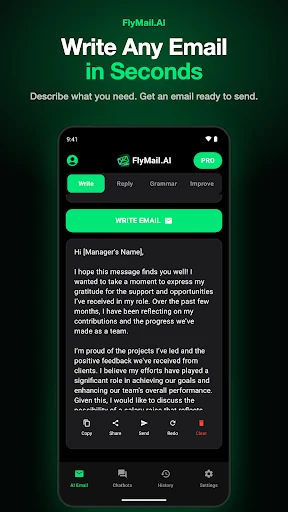
Open the AI Email screen. It has four tabs: Write, Reply, Grammar and Improve. Start with Write and be specific, because a vague request gets a generic draft.
Ask my landlord, [Name], to fix the bathroom fan before [date]. Friendly, short, mention I reported it on [date].
Tap Write Email. You get a greeting, body and sign-off. Under the draft are Copy, Share, Send, Redo and Clear. Check the Text Preferences if the result feels off: length (Short, Medium, Long) and tone are set there, with more than 30 tones to pick from.
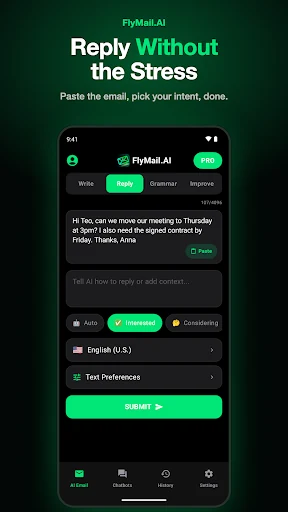
Then try Reply. Paste an email you received, add a line about how you want to answer, pick an intent chip such as Interested or Considering, and submit.
What it does not do
FlyMail is not an email client. It never reads your inbox, so you type, paste or photograph the text, then copy or share the result into Gmail, Outlook or Apple Mail. It also does not know your history with the recipient unless you say so.
Like any AI email writer, it can invent a date, a number or a name when your request leaves a gap. Read every draft before you send it. The developer states that FlyMail does not sell or share your data.
For a comparison with other apps, see our roundup of the best AI email writer options. For Apple-specific notes, there is a separate guide to the iPhone email writing app setup.
Frequently asked questions
Is the AI email writer app free to download?
Yes. FlyMail is a free download on both the App Store and Google Play. Full use needs FlyMail PRO, an in-app purchase.
Do I need to sign up to use FlyMail?
The store listings do not describe an account step, so we won't promise either way. Install the app and open it to see what it asks for.
Can I download FlyMail on a computer?
There is no web version or browser extension. Apple silicon Macs can install it from the App Store, and everyone else can scan the QR code on this page to reach the store on a phone.
Which iPhone versions work with FlyMail?
On Apple devices the app installs only if the iPhone or iPad runs iOS 18 or a newer version. Older versions of iOS are not supported.
Does FlyMail read my Gmail or Outlook inbox?
No. FlyMail does not connect to your inbox, so you paste or photograph the email you want to answer and send the draft from your own mail app.
What is the app called in the stores?
On the App Store it is "AI Email Writer - Fly Mail", and on Google Play it is "FlyMail: AI Email Generator". Both are made by ATN Marketing SRL.
Try FlyMail on your phone
Free download for iPhone, iPad and Android. Write, reply, fix grammar and change tone in one app.